Cursor for designers: why I left Figma Make for real product work
Figma Make is great until the thing has to actually work. Here's the loop I use instead, and what building in code exposed that mocks never did.

Figma Make pissed me off. Like actually pissed me off.
I was trying to build something real. Not a hero section. Not a fake UI. Real product shit. Upload, processing, validation, a graph, a review step. Something with actual moving parts.
And it felt wrong immediately. Like dragging your hand across rough paper. Every interaction had friction. You could feel the tool pushing back.
Every small change cost me credits. I burned through two full rounds and needed three top-ups just to keep going. Stuff would hang mid-generation and I'd sit there, staring at it, watching it eat credits.
And when it finally gave something back, it was off. Not completely wrong. Just wrong enough. Close enough to trick you. Not good enough to use.
At some point I just sat there like… what the fuck am I doing.
It wasn't a tool problem. It was a process problem.
Here's what I realized once I stopped pulling the lever.
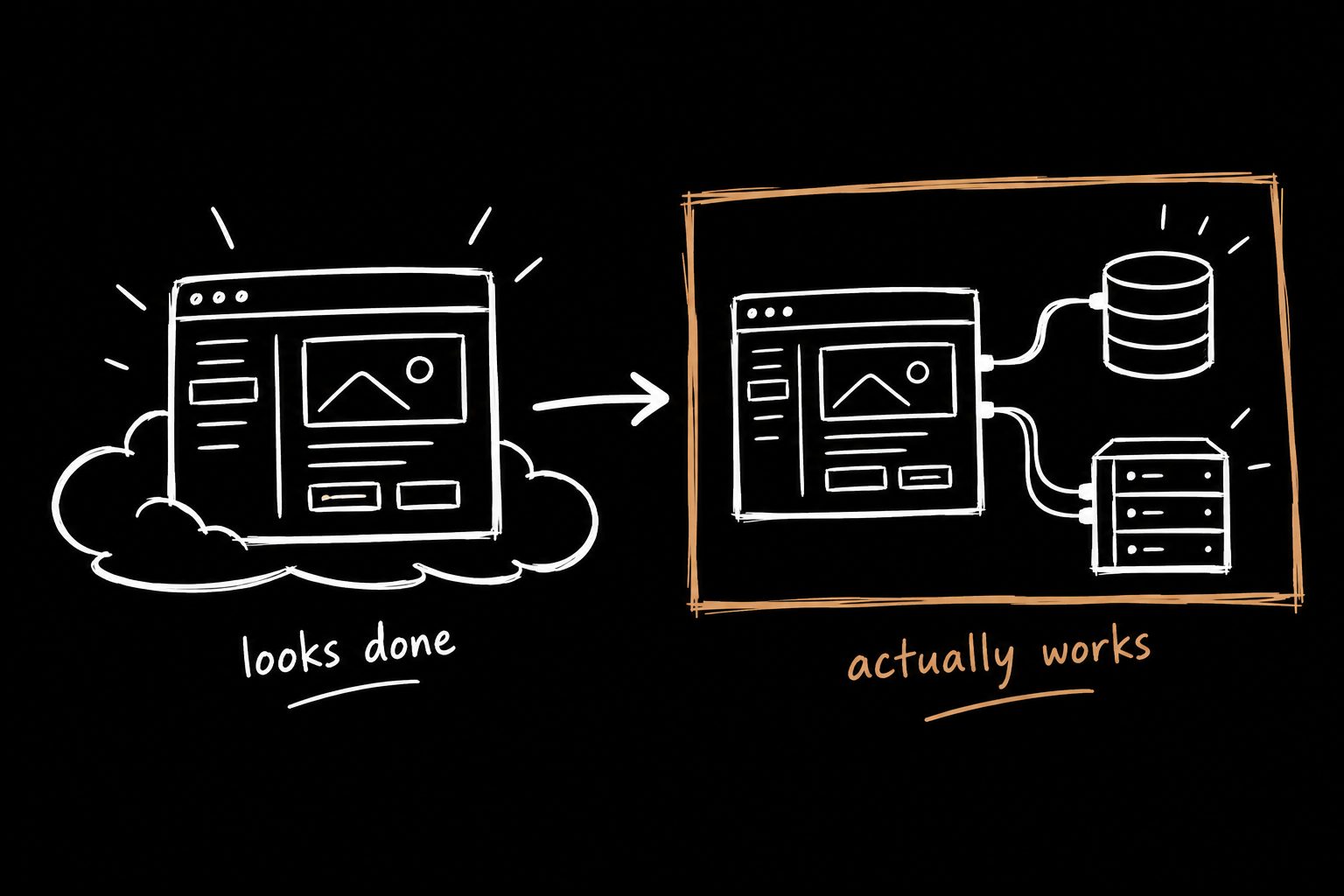
I wasn't building something simple. It was a system.
Things connect. State moves. Users move through it.
And you can fake that in Figma. Everything snaps. Everything aligns. Everything looks finished.
Until it has to actually work.
Wireframes hide that. Mocks hide it even better. And yeah, I've been part of that.
So the tool didn't fail me. My process did. That's what forced the switch to Cursor.
The loop that replaced it
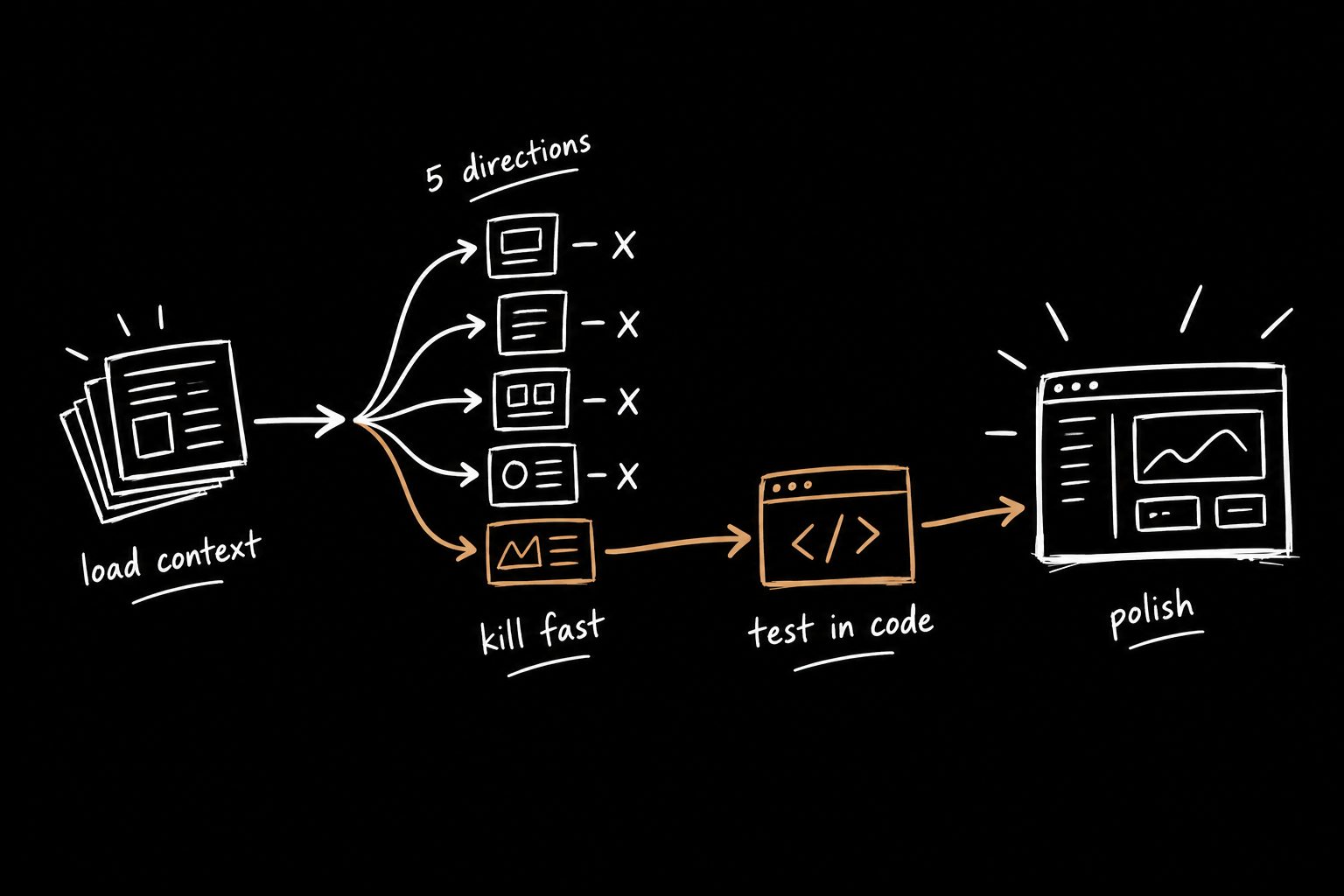
Step 1: Talk it out. I opened a voice chat and just explained the product like I would in a meeting. The admin uploads a batch of PDFs. Nodes validate logic. Users think in files, not forms. Messy, but real.
Step 2: Write the PRD. I turned that conversation into a PRD and saved it as a markdown file in the project. That file became the source of truth. If you need a starting point, here's the PRD template I use.
Step 3: Build one piece at a time in Cursor. Upload. Processing. Graph. Inspector. Review. Build it, use it, break it, fix it, repeat.
Step 4: Use the product. Not look at it. Use it.
Step 5: Fix what breaks. Then go back to step 3.
That's spec-driven development, and for real products it's a better loop. No fake certainty. Just truth. Truth is uncomfortable at first. But it's way faster.
Everything broke once it was real
Too many nodes. Wrong mental model. Numbers didn't match. The flow didn't make sense.
Not visually. Fundamentally.
Like wearing something that looks fine in the mirror but feels wrong the second you move.
These weren't design tweaks. They were product decisions, and I only saw them because the thing was real. Nodes became files. The summary step got killed.
The inspector became contextual. Layout mattered more than styling. I switched to React Flow and added guided review.
All obvious once it was real. None of it obvious in Figma.
You don't find these problems by thinking harder. You find them by running into them.
Cursor vs Figma Make for designers
| Figma Make | Cursor | |
|---|---|---|
| Best for | Quick visual explorations, simple screens | Real flows with state, data and edge cases |
| Cost model | Credits per generation | Flat subscription |
| What you're working with | Generated output you negotiate with | Real code, real libraries, real components |
| Where it breaks | Multi-step systems and logic | Pure visual polish |
| Feedback loop | Generate, wait, hope, repeat | Build, use, break, fix, repeat |
Flat cost was a bigger deal than I expected. No credit anxiety means you iterate without flinching. It feels like working with the product instead of negotiating with a tool.
A small, real example
Engineering needed a real fix for an accessibility issue before the end of a sprint. Focus order for an action bar that appears when you select rows in a table with checkboxes.
Instead of writing it up, I built a simple HTML demo in Cursor. We fixed focus so it returns to the right place after updates. We moved the banner in the DOM so it reads logically but stays fixed at the top visually.
We cleaned up keyboard behavior so tabbing feels normal.
The rules kept changing as we tested edge cases. Cursor made it easy to adjust without getting stuck. Instead of talking about it, engineering had something real to react to.
Figma still has a job
I'm not anti-Figma. After the logic holds up in code, I move to Figma and clean it up. Visual polish, design system alignment, handoff.
The change is the order. For this kind of work I'm not starting with wireframes anymore. Too easy to lie. If it matters, build it. If it breaks, fix it.
Speed didn't let me skip the fundamentals. It just told me, fast, which ones were real. Wireframes first? Habit. Knowing what the product has to do before you build it? Rule. Learn it to break it.
Anyone can generate screens now. Fewer people can build something that holds up the second a real user touches it. That's the gap worth being on the right side of.
I wrote up the full day-to-day version in the AI prototyping workflow I actually use.
The step before Cursor matters most
Notice that the loop starts with a conversation and a PRD, not with Cursor.
Building fast only helps if you're building the right thing. That's decided in the kickoff: what you're solving, what you're not, how much time you have, what tradeoffs you'll accept. Here's how I run that kickoff.
Builder Kickoff™ packages the whole front half of this loop. You run the session, record it, and get the PRD and a prototype prompt you can drop straight into Claude or Cursor the same day.
Cursor for designers FAQ
Do designers need to know how to code to use Cursor?
No, but you need to be comfortable reading what it produces and testing it. You're directing the build and judging the result, not hand-writing every line.
Is Cursor better than Figma Make?
For real product flows with state and logic, yes, in my experience. For quick visual exploration of simple screens, Figma Make is fine.
What should I build first in Cursor?
One piece of a real flow you're already working on. Not a toy project. Something where the logic is the hard part.
Will this replace Figma?
Not for me. Figma is where I polish and align with the design system. Cursor is where I find out if the thing actually works.